by Leslie Wyse
 What it is:
I had the opportunity to demo a pair of T-Comms for several days, which were loaned to me by Advanced Bionics for the purpose of this review. The T-Comm is Advanced Bionic’s newest accessory for the Neptune processor, which dramatically improves the ease of phone use with the Neptune. The T-Comm utilizes Advanced Bionic’s patented T-mic for natural microphone placement against the ear, and has a built-in T-coil which can be used with compatible phones or if you have a T-coil accessory such as a neck loop. The T-Comm also works with the older PSP body-worn processor. It is also compatible with all types of Harmony and Auria headpieces, both concave and flat.
How it works:
The T-Comm has a single 3-position switch: T-mic only, T-mic+T-coil split, and T-coil only. When the T-Comm is connected to the Neptune, the microphone in the headpiece is automatically disabled so that the only microphone is in the T-mic. The T-coil is built into the T-Comm which means no additional programming or attachments are required to use it, only the flip of the switch. Also included are formable retention wires in two lengths to allow for a more secure fit. The T-Comm requires a standard headpiece (UHP), UHP cable, and a T-mic, all of which I already had for my Harmony processors. The great news is that the T-Comm is ready to use straight out of the box; no special programming is required at the audiologist’s office.
In Use:

T-Comm (left) vs. Harmony (right)

Harmony(top) T-Comm(bottom)
The first thing I noticed was how super small, sleek, and lightweight the T-Comm was. Advanced Bionics really did a nice job with the design; it is modern looking and just feels nice to the touch. Assembly took but a few seconds. I will admit that I was skeptical that I would like wearing the T-Comm because my favorite feature of the Neptune is the freestyle design with nothing on the ear. However, I found the T-Comm to be very comfortable to wear, and so lightweight that I barely noticed it was there. The T-Comm is much thinner and a fraction of the size and weight of my Harmony processors with slim batteries, and therefore more comfortable to wear for long periods of time. It is small enough that it was nearly invisible when I wore my hair down, as you can see in the photos. I found that I did not need to wear the retention wire unless I was doing something really active, like running. Even without the wire it stayed on just as well, if not better, than my Harmonies while I cleaned the house and rolled on the floor to play with my baby. Now I just need to figure out how to train baby to not yank on the cables!

My poor man’s T-mic adapter!
My favorite thing about the T-Comm is the simplicity of phone use with my Neptunes. By moving the microphone from the headpiece to the T-mic on the ear, the T-Comm eliminates the awkwardness of holding the phone up to the headpiece on the back of the head. Without the T-Comm, I had decent luck using my cell phone after a little practice (and bluetooth is possible with a cellphone using an adapter via the direct connect). But for my office phone I crafted a foam adapter out of the Neptune packaging to help guide the phone and block out background noise, essentially trying to achieve the same functionality that the T-mics with my Harmonies gave me. Obviously the T-Comm is a vast improvement! As promised, I was truly able to hold my phone up to my ear and have a perfectly clear conversation. The T-mic with T-Comm worked well with both my Blackberry cell phone and my work phone, though the sound quality was a bit better with my cell phone, just as it is with the T-mics on my Harmonies.
I have had such great success using the T-mic with the phone that I have not needed to use T-coil with my Harmonies, but I did test out the T-coil setting on the T-Comm for the sake of this review. With my Blackberry cell phone, the T-Mic sounded better than the T-coil setting because I heard some static on the line with the T-coil setting. However, the T-coil setting sounded great with no static on my office phone, so for me it would be a toss up which setting I would use at work. I did have to play with phone location a bit to find the sweet spot of the T-coil signal from the T-Comm. When using the T-coils with the phone, the user will want to use the “T-mic + T-coil” setting because the “T-coil only” setting prevents the user from hearing their own voice. The “T-coil only” setting would probably work best with neck loop accessories.
I noticed a small improvement in the quality of sound through my T-mics on the T-Comm versus sound through the headpiece microphone. Overall the microphones sound almost the same, but I think sound was just a bit louder and crisper through the T-mics, probably because of their location in the bowl of the ear. A small trade-off of having the microphone in the ear is that it was not quite as easy to hear sound behind me. Another small benefit of moving the microphone from the headpiece to the T-mic was that it eliminated the sound of my hair brushing up against the microphone that I occasionally hear when I wear the headpiece under my long hair. I will say that the sound quality through the T-Mic with the Neptune is exactly the same as the T-mics with the Harmonies.
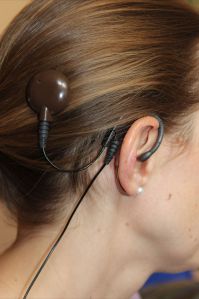
Usually my hair covers the headpiece and wires
Volume and program adjustments are still made with the Neptune Connect controller on the Neptune processor itself. The user has the option of leaving the Neptune Connect controller on or off with the T-Comm, but as always the controller must be removed prior to water use. There are 3 program slots on the Neptune. Currently I have two programs slots set up with the default 50/50 microphone setting, and the third slot I have reserved for “aux only” which disables all microphones and only allows in sound from the direct connect cable (i.e. music from my iPod). These programs all worked whether or not I used the T-comm. When I used the direct connect with T-Comm on either of my two 50/50 microphone programs, incoming sound was split between the T-mic and the direct connect. On a side note, the direct connect is one of my other favorite features of the Neptune – I’m always plugging in my iPhone, iPod, or bluetooth adapter for my phone and TV.
Some wearers might like that standard headphones can be used with the T-mics on the T-Comm, something that’s not practical when the microphone is in the headpiece. Personally I’d probably always use the direct connect for music, which eliminates the need for headphones. The direct connect option does require that the Neptune Connect controller be worn.
Another nice thing about the T-Comm is that it is powered by the Neptune processor itself and does not require its own battery. This means that I don’t have to charge up another accessory on my already very full power strip at my bedside.
Also note that the T-Comm is NOT waterproof and that the AquaMic cables and AquaMic headpiece will not work with The T-Comm. This might be something to consider when ordering cable lengths.
For bilateral users, the question arises whether to purchase one or two T-Comms, as one T-Comm is enough for the phone. I’m bilateral, with a dominant ear and my weaker ear is poor enough that it doesn’t yet discriminate speech, and doesn’t benefit from the improved microphone settings of the T-mic, so I will probably only purchase one. Bilateral users who plan to use any type of neck loop system will most certainly want two T-Comms.
The T-Comm is quick and easy to set up, but is probably not something that you would want to hook up only when the phone rings. The drawback to the T-Comm is that there is something on the ear, and one additional cable to the headpiece. It is small and lightweight enough that I didn’t notice the T-Comm and additional cable during all-day use, but it is still not quite as comfortable having nothing on the ear at all. While the T-Comm accessory would be secure with the retention wire when I’m doing really active things like running, skiing, and mountain biking, I probably wouldn’t wear it then simply because I don’t normally use my cell phone during these activities. I picture myself wearing the T-Comms to work and on days when I plan to make a lot of phone calls. I’ll probably still want to go “freestyle” without the T-Comm on weekends and my active days, as there really is nothing as nice as nothing on the ear.
Bottom Line:
Advanced Bionics really scored with this new accessory for the Neptune. With the T-Comm, the Neptune really becomes the most versatile cochlear implant processor on the market. I already loved my Neptunes before I tried this accessory, but now I know I’ll love them even more. I used to mostly wear my Harmonies to work, and my Neptunes on nights and weekends, but with this T-Comm accessory I think I might just move the Neptunes up to the full-time slot. I will be placing my order for a T-Comm accessory tomorrow.
 About the Author:
Leslie Wyse was bilaterally activated on Sept 1, 2012, and wears both the Harmony and Neptune processors from Advanced Bionics. She was born deaf in her left ear, and had mild/moderate loss in her right ear that rapidly declined to complete deafness at age 35. She lives in Vail, Colorado with her husband and infant daughter, works as a structural engineer, and enjoys a very active mountain lifestyle.

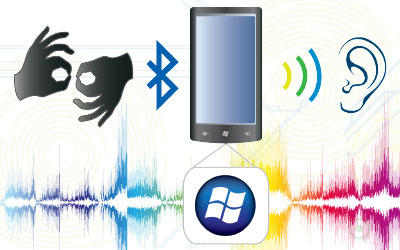 Four Ukrainian students have created gloves that allow speech- and hearing-impaired people to communicate with those who don’t use or understand sign language. The gloves are equipped with sensors that recognize sign language and translate it into text on a smart phone, which then converts the text to spoken words.



 cochlear implant HELP